An (eev-based) alternative to emaxima.sty
(Status: work in progress!!!)
Long story short, in an image...
In this page I explain how I convert Maxima logs to LaTeX -
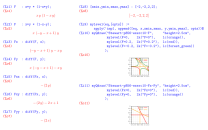
and how I generate things that look like this (click to go to the PDF):
My main page on Maxima is here.
- 1. EMaxima and emaxima.sty
- 2. Maxima3.lua: internal view
- 3. Maxima3.lua: external view
- 4. Changes in maxima-font-lock.el
- 5. Status: please nudge me!
- 6. The video
- 7. `emaxima.lisp'
- 8. Maxima2.lua
- 9. Maxima2.lua: a demo
- 10. Dednat7
- 11. `find-Maxima2-links'
1. EMaxima and emaxima.sty
Maxima comes with several interfaces that can convert "Maxima sessions" to LaTeX. One of them is EMaxima, that comes in the directories interfaces/emacs/emaxima/ and doc/emaxima/ of the source tree, and that (apparently?) is a cell-based interface like Org mode... its manual is here.
I never understood EMaxima well, but according to the section 5 of its manual in it we can edit "Maxima cells" in a text document, and use functions like `emaxima-update-cell' and `emaxima-tex-update-cell' (defined here) to update the parts of the cells that contain the results.
My presentation at the EmacsConf2025 was mainly about different notions of "easy" and "simple". EMaxima was "easy" and "simple" in ways that didn't work for me, so I ended up using only a few parts of it, and reimplementing some of its ideas in other ways, and in other languages - mainly in Lua.
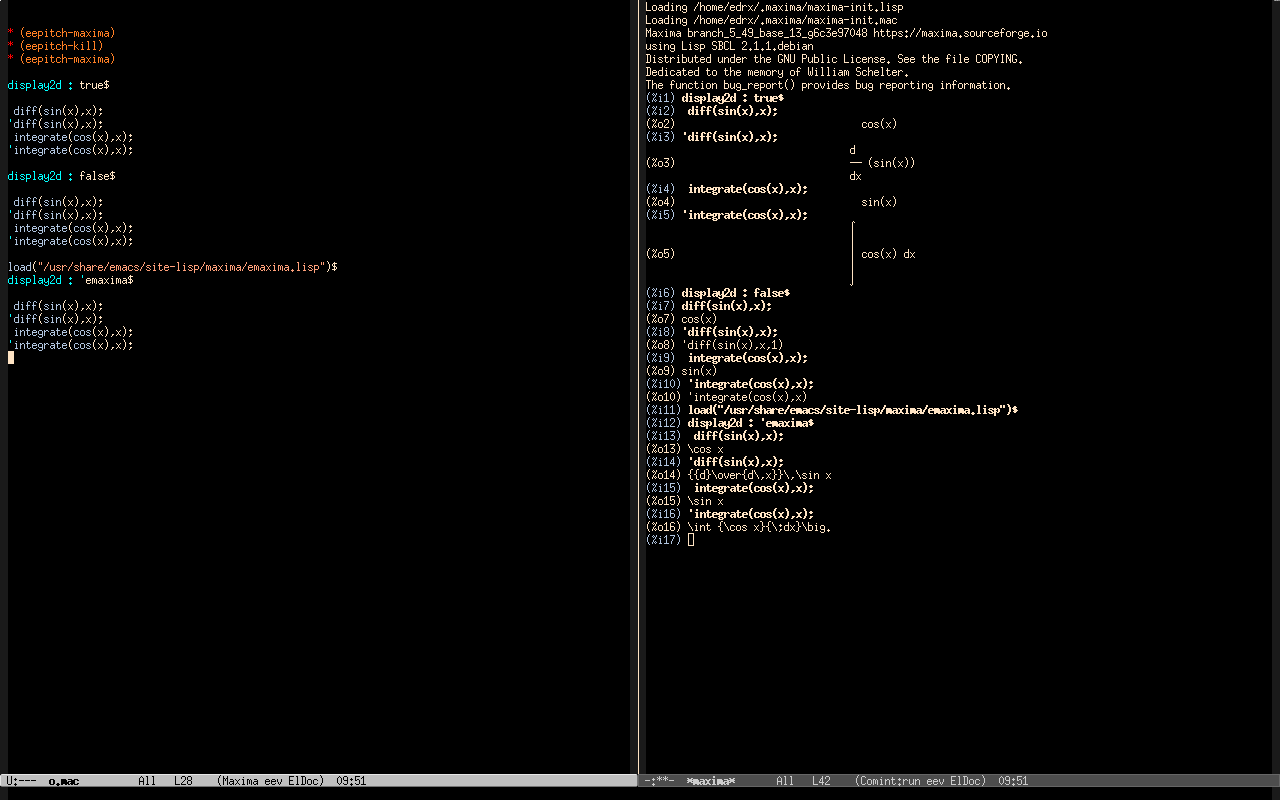
The screenshots below show two parts of EMaxima that I use with very few changes and one part that I reimplemented completely.
In the first screenshot we see a buffer in "Maxima mode" (at the left) and its log (at the right). The log shows the two standard behaviors for "(%o)" lines - "display2d:true" and "display2d:false"; see display2d - and a third behavior, "display2d:'emaxima", that is implemented by emaxima.lisp, in which the "(%o)" lines use tex1.
The fontification of the Maxima buffer is done by maxima.el and maxima-font-lock.el. TODO: explain my changes to maxima-font-lock.el.
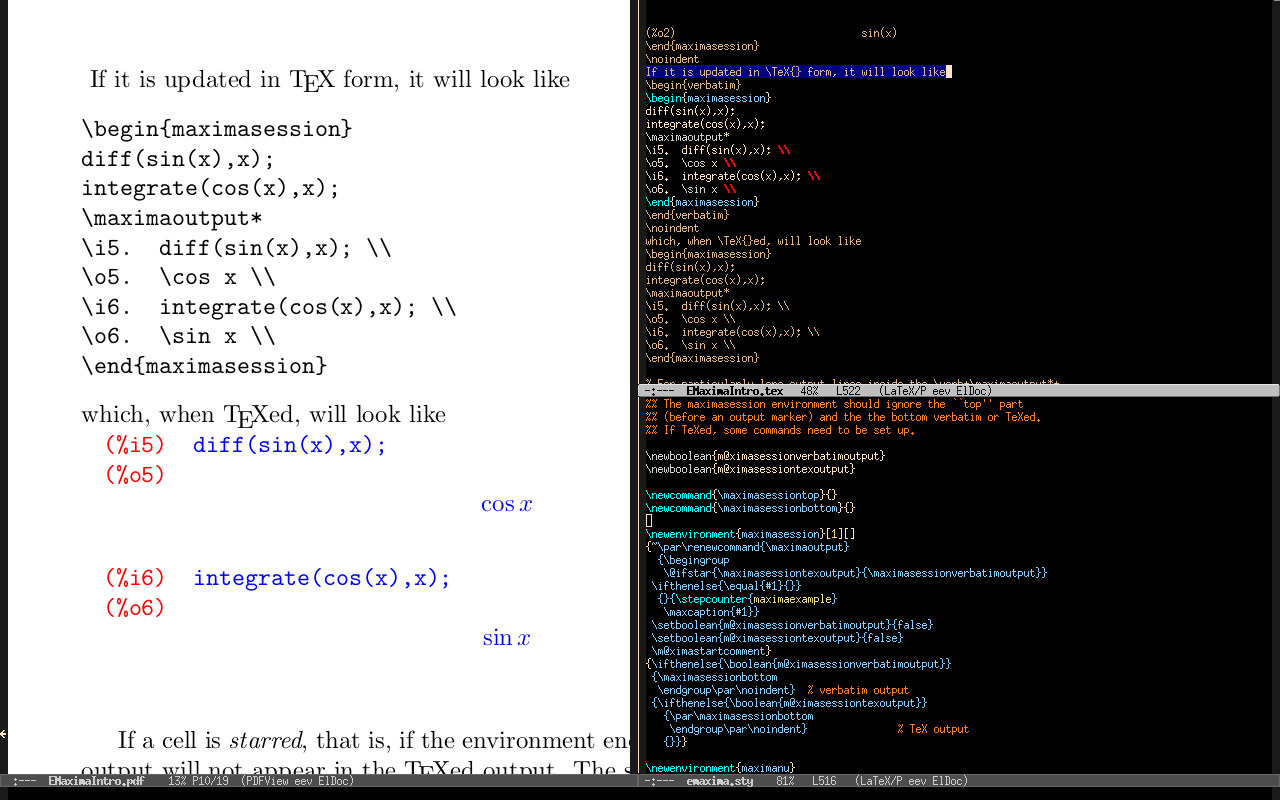
The second screenshot shows how EMaxima converts a log done with "display2d:'emaxima" to LaTeX. The window at the left shows a part of page 10 of the EMaxima manual, the windows at the right show parts of EMaximaIntro.tex and emaxima.sty. The conversion does this:
| as: |
|
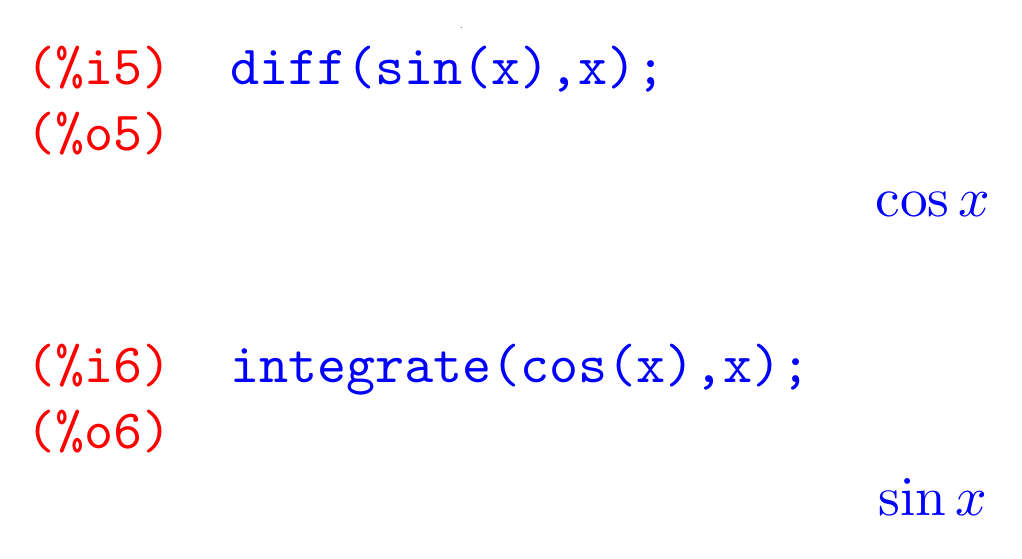
The environment "maximasession", used in the "\begin{maximasession} ... \end{maximasession}" block, is:
- "blackbox-ish", in the sense that I explained here and here, and
- "fragile", as it is based on the "verbatim" environment of LaTeX. It uses some tricks with catcodes, and that makes putting "\begin{maximasession} ... \end{maximasession}" blocks inside "\def"s either very hard or impossible. Also, I couldn't find a way to put the output of a "maximasession" block in a box, to scale these logs or display two logs side to side... all my attempts to do that either failed completely or worked only on very well-behaved cases.
2. Maxima3.lua: internal view
Let's start by understanding how Maxima3.lua does something similar to the conversion above - in several steps that are much easier to inspect and to tinker with than the steps that emaxima.sty performs under the hood - remember that emaxima.sty does everything in LaTeX, with no debugging tools, and practically no one knows how single-step through LateX code.
I will explain the main data structures first, and in the next section I will explain how to use all that "as a user".
- Suppose that I run the "Maxima commands" in the first beige block below with eepitch in a Maxima REPL, after running "display2d:'emaxima" in it. The important part of what appears in the target buffer is what is in the second beige block below - the one that has label "The "*maxima*" buffer". The actual inputs and outputs are much bigger than that; I am only showing the most important part.
- Emacs saves the contents of the "*maxima*" buffer to a certain
file; Maxima3.lua reads that file, and uses the function SplitIntoMIOs.linestoblock to convert it to an
unnamed MaximaBlock.
- A MaximaBlock is a list of MaximaIO objects, a.k.a. "mio"s.
- A mio is composed of "i" lines, "ip" lines, and "o" lines.
- The "ip" lines, or "i-plus" lines, are the lines that are still part of the input but that don't have an initial "(%i)".
- The default way of displaying a mio uses :tostructrect(), that shows which lines are in the lists ".i", ".ip", and ".o"...
- ...and this explains why the beige block labeled "One unnamed block" is divided into "i:"s, "ip:"s, "o:"s.
- The "unnamed block" is split by SplitIntoBlocks.splitbigblock into several - in this case, two - "named blocks". In this process the "input part" of some mios may be changed; the lines like "/* block foo */" disappear, and some blank lines are deleted. The hard part of that step is done by the method :cleanblockname() in the class MaximaIO.
- In the passage from "Two named blocks" to "LaTeX/Dednat7 code"
each "named block" is converted to LaTeX code in two ways:
- first each named block becomes a block of LaTeX code that has a block of "%M" lines, a block of "%L" lines, and then a "\pu". The "%M" and "%L" are "heads", are are explained here; the "\pu"s are (badly) explained here.
- The effect of running one of these %M/%L/pu blocks in LaTeX/Dednat7 is explained here.
- Then Maxima3 generates a block of code using my "poor man's multicolumn mode", with \firstcol and \anothercol, in which each of the named blocks is displayed in a different column.
- The method :all_in_one_slide() in SplitIntoBlocks generates a big string with the %M/%L/pu blocks and then the multicolumn thing. That big string is meant to be inserted into a .tex file, and its lets us test the output - and it usually needs adjustments.
- When LaTeX runs the "LaTeX/Dednat7 code" each "%L maximahead:sa(...)" generates a "\sa{...}{\maximavbox{...}}" - like the ones in the beige block with the label "The output of the "%L" lines". This is explained in the comments of the class MaximaHead.
| Maxima commands: |
| |
| The "*maxima*" buffer: |
| |
| One unnamed block: |
| |
| Two named blocks: |
| |
| LaTeX/Dednat7 code: |
| |
| The output of the "%L" lines: |
|
3. Maxima3.lua: external view
4. Changes in maxima-font-lock.el
5. Status: please nudge me!
(find-windows-beginner-intro "12.1. `M-x ils' and friends") (find-angg "MAXIMA/edrx-maxima.el" "ile") |
6. The video
7. `emaxima.lisp'
If we run this
* (eepitch-maxima) * (eepitch-kill) * (eepitch-maxima) load("/usr/share/emacs/site-lisp/maxima/emaxima.lisp")$ :lisp (setf (get '$display2d 'assign) nil) display2d:'emaxima$ linenum:0; diff(sin(x),x); integrate(cos(x),x); |
the last part of the log is:
(%i1) diff(sin(x),x); (%o1) \cos x (%i2) integrate(cos(x),x); (%o2) \sin x (%i3) |
that is similar to the syntax that `maximasession' understands.
Here is the reason for the `setf':
(find-es "maxima" "emaxima-bug-2024jul20") (find-maximamsg "58797458 202407 21" "Edrx: display2d:'emaxima; fails in a recent Maxima") (find-maximamsg "58797475 202407 21" "RDodier: :lisp (setf (get '$display2d 'assign) nil)") |
8. Maxima2.lua
Dednat6 is a LaTeX package that I wrote, and that I use to typeset many kinds of diagrams. It very unpopular: I only know one person who uses, or who has used it, besides me - a friend of mine called Fernando Lucatelli - but Dednat6 is very easy to extend, and sometimes I write new extensions for it as quick hacks.
One of these extensions is Maxima2.lua. If I put this in a LaTeX file at any point after the part that loads Dednat6,
%L dofile "Maxima2.lua"
\pu

%M (%i1) diff(sin(x),x);
%M (%o1) \cos x
%M (%i2) integrate(cos(x),x);
%M (%o2) \sin x
%M (%i3)
%L maximahead:sa("sin-cos", "")
\pu

\def\hboxthreewidth {14cm}
\ga{sin-cos}
|
the "dofile" loads Maxima2.lua, that defines "%M" as a new "head"; the code for that is here. Then when Dednat6 processes the "%M"-block it simply puts the lines after the "%M"s into the global variable maxima_lines as a multi-line string, and when Dednat6 processes this line
%L maximahead:sa("sin-cos", "")
|
it "output"s this LaTeX code:
\sa{sin-cos}{%
  \vbox{%
    \maximablue{(\%i1)\ diff(sin(x),x);}%
    \maximared{(\%o1)\ }{}%
    \maximared{}{\cos x}%
    \maximared{}{}%
    \maximablue{(\%i2)\ integrate(cos(x),x);}%
    \maximared{(\%o2)\ }{}%
    \maximared{}{\sin x}%
    \maximared{}{}%
    \maximablue{(\%i3)}%
  }%
}
|
The definitions for "\sa", "\ga", "\maximablue", and "\maximared" are here:
(find-LATEX "edrx21.sty" "sa-and-ga") (find-LATEX "edrx21.sty" "maximablue-red") |
The "%M"-block is easy to tweak by hand. The "output" sends some (ugly!) TeX code both to the TeX part of lualatex and to stdout - it appears in the log, but I usually don't look at it.
Note that the " "s and the "%"s in the "(%i)" lines of the "%M"-block were converted to "\%"s and "\ "s. This was done by Co1.lua, as a trick to quote certain characters without needing to change catcodes.
The "\sa{sin-cos}" is a kind of "\def". I can expand its definition using "\ga{sin-cos}" - and I can do that inside the macros that I use for scaled multicolumn output.
9. Maxima2.lua: a demo
You can see a non-trivial example in this PDF. Note that it has a page that has two matrices with diagrams in its entries, that looks like this:
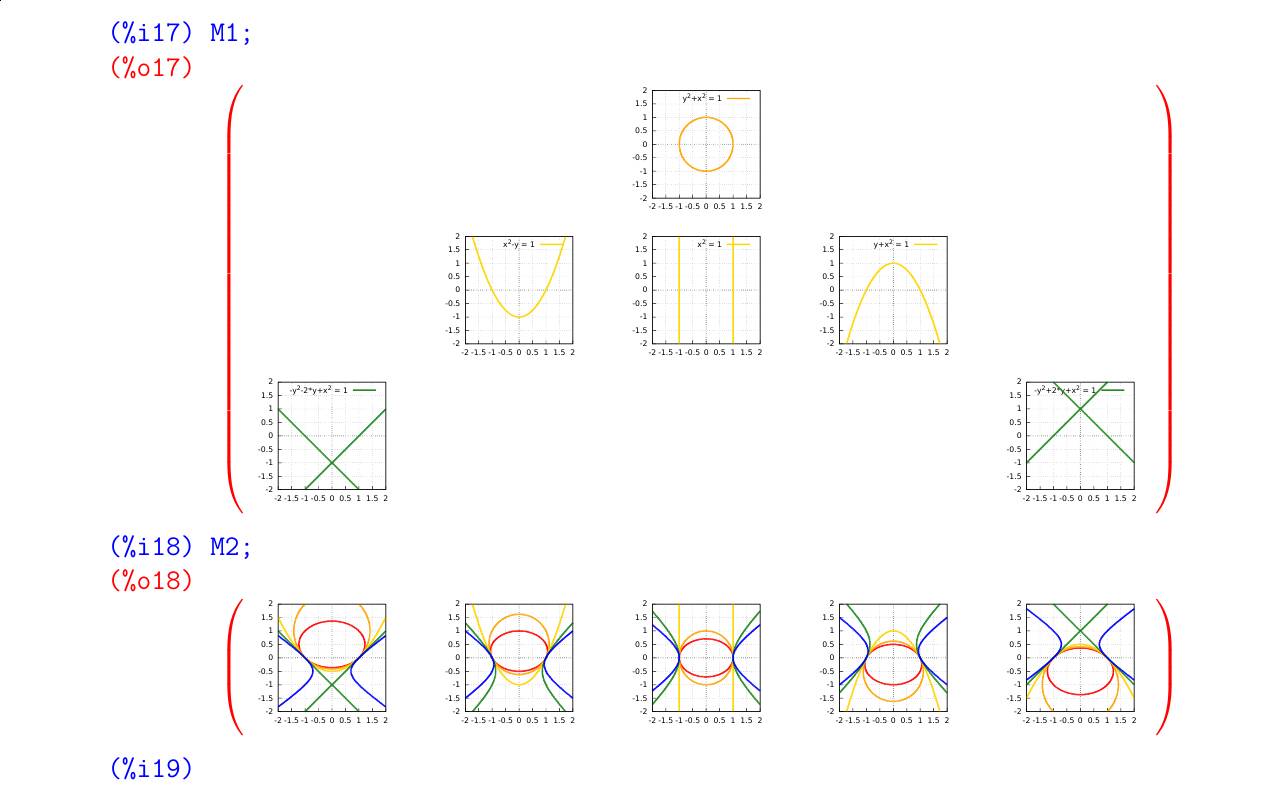
See my page on Qdraw and MyQdraw for some explanations - but they are very incomplete at this moment. Links:
(find-LATEX "2024-2-C3-maxima-conics.tex" "M-blocks") (find-es "qdraw" "some-conics") |
To download the source of that PDF and compile it on your machine, run this:
* (eepitch-shell) * (eepitch-kill) * (eepitch-shell) rm -rfv /tmp/edrx-latex/ rm -rfv /tmp/2024-2-C3-maxima-conics.zip wget -P /tmp/ http://anggtwu.net/LATEX/2024-2-C3-maxima-conics.zip mkdir /tmp/edrx-latex/ unzip -d /tmp/edrx-latex/ /tmp/2024-2-C3-maxima-conics.zip cd /tmp/edrx-latex/ lualatex 2024-2-C3-maxima-conics.tex # (find-fline "/tmp/edrx-latex/") # (find-pdf-page "/tmp/edrx-latex/2024-2-C3-maxima-conics.pdf") |
10. Dednat7
The demo above - the eepitch block that downloads, unpacks and compiles 2024-2-C3-maxima-conics.zip - uses Dednat7 instead of Dednat6! More on that later...
11. `find-Maxima2-links'
To generate an "%M"-block from a Maxima program I use `M-x find-Maxima2-links' - where find-Maxima2-links is a very messy 5-minute hack.