Some problems of modernizing Emacs (eev @ EmacsConf 2025)
This is what I presented at the EmacsConf 2025 in 2025-dec-07.
Here are links to the full schedule of the
conference and to my talk in it.
The best way to play this video from eev is with `M-x 1c' - it is "eev2025".
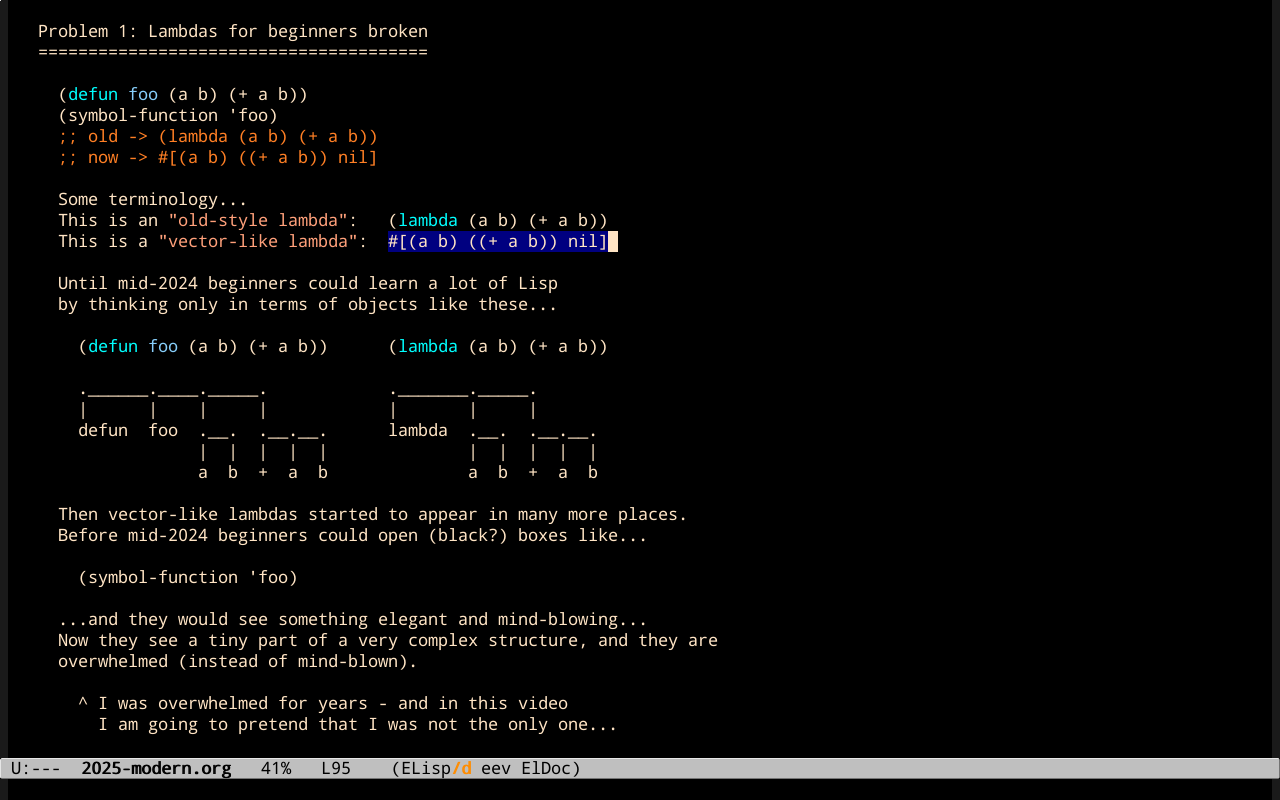
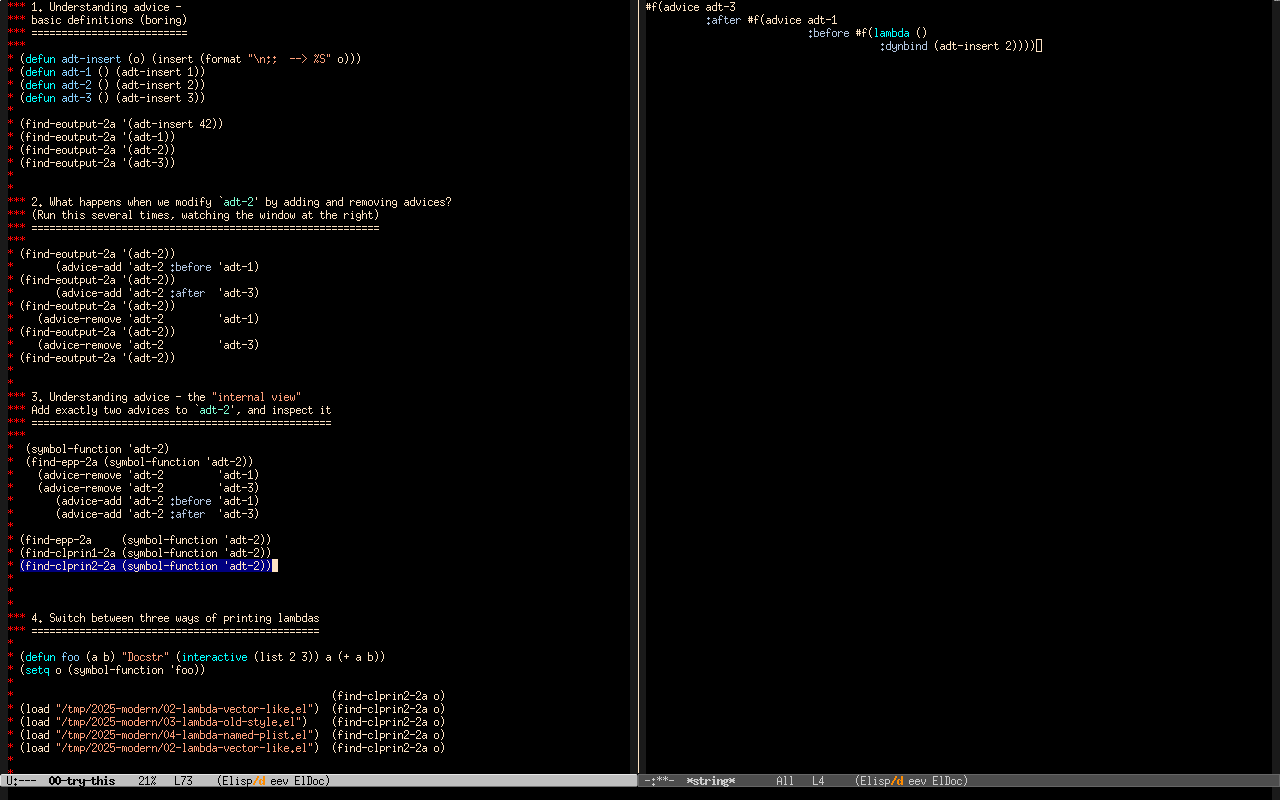
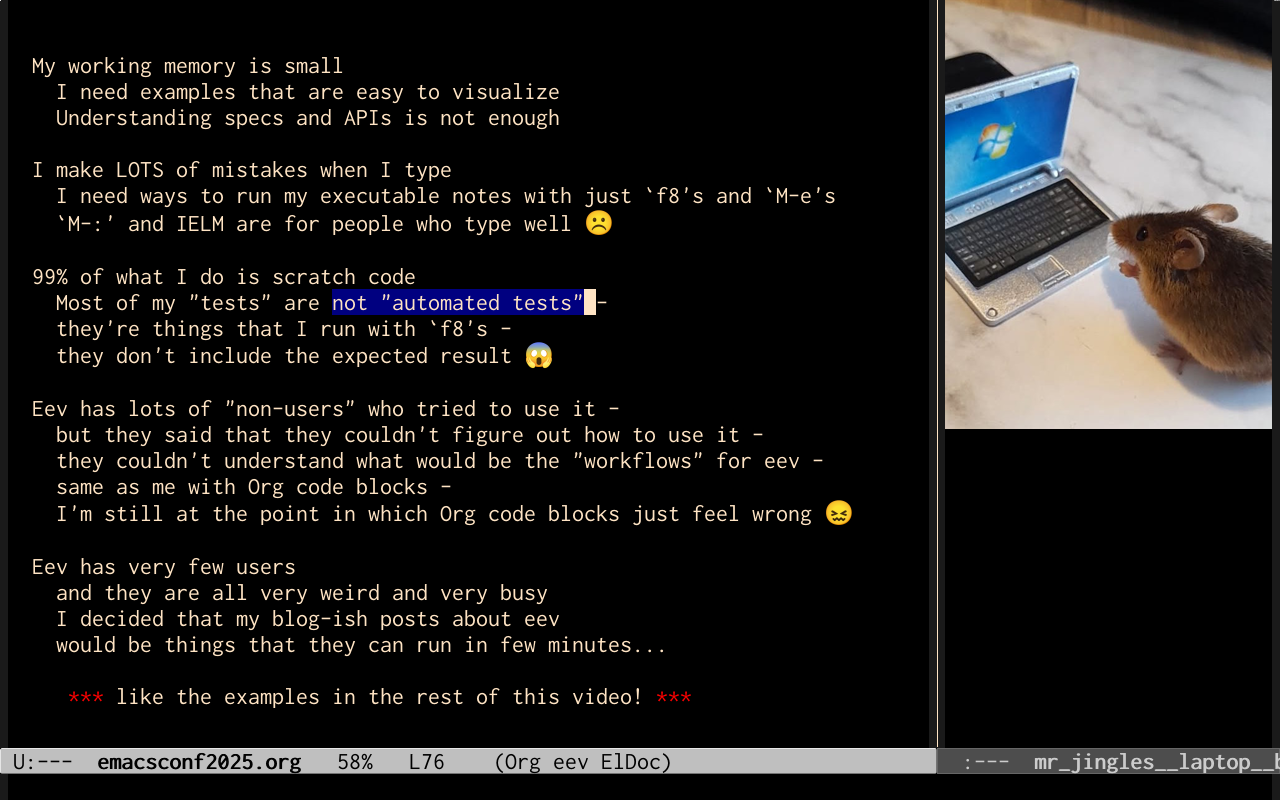
My presentation had two title pages because it was made of a new "beginning", an old "middle", and a new "end" - see the explanations below. Here are some screenshots:

1. Talk description
The "talk description" that I submitted to the conference was this one:
This talk is going to be a reworked version of the incomplete video in http://anggtwu.net/2025-modern.html. I will start by presenting several notions of "simplicity" and "elegance", and show that when I started learning Elisp it was "simple" and "elegant" in a way that it no longer is; then I will show how to fix some tiny parts of the problem by 1) using functions based on `cl-prin1', 2) redefining some printing methods with "(cl-defmethod cl-print-object ...)", and 3) using Common Lisp to understand some recent parts of Elisp that are not well-documented.
2. The video
I didn't follow the "talk description" above very well. Instead I recorded a video that was composed of:
- (0:00-0:54) A new introduction,
- (0:55-12:58) The good part of "2025-modern", that was from 0:00 to 12:04,
- (12:58-25:22) New stuff, that was easy to test, and that corresponded to the files below:
(find-angg "2025-modern/00-try-this") (find-angg "2025-modern/01-base.el") (find-angg "2025-modern/02-lambda-vector-like.el") (find-angg "2025-modern/03-lambda-old-style.el") (find-angg "2025-modern/04-lambda-named-plist.el") (find-angg "ORG/emacsconf2025.org") |
You can try to run the "00-try-this" with the first (find-angg
...) above, but note that there is one line in it that calls a
function that was only added to eev in 2025dec20 - so if have an old
version of eev so there will be one point in "00-try-this" in which
typing `f8' will give an error.
I used (with permission!) a photo of Mr Jingles taken by Martin Critchlow, who is Mr Jingles's favourite human.
3. Simple, elegant, etc.: links
My tendency when I think that I have to explain my notions of "simple", "elegant", "fun", "easy", "hard", and "overwhelming" is to think that I have to explain all of them in a few lines - and that is too hard. One alternative is to quote other people, and use links.
Alan Mackenzie thinks very similarly to me, and I've been collecting links to messages that he sent to emacs-devel, each with a small excerpt to make the collection slightly easier to navigate. His 559 below is exactly my "problems with modernizing Emacs", but written by another person; in his 565 he says that he "lost enthusiasm for the Emacs project" for exactly the same reasons as me.
Here are some of his messages to emacs-devel in dec/2025,
- 274: Its central core is undocumented
- 277: Both of the suggested cl- macros are unmaintainably obscure
- 284: Debugging is harder work and less rewarding than it was ~20 years ago for this reason
- 303: We have overcomplicated fragments from Common Lisp
- 311: My rate of progress was cut in half by having continually to read undocumented source code
- 334: They answered points I didn't make. Few engaged with my points. That isn't kind communication
- 349: But if cl-generic.el, oclosure.el, pcase.el, and a few others had been documented to the customary Emacs standard
- 364: cl-loop's doc string, if completed to normal Emacs standards, would be many, many pages long
...and some of his messages to emacs-devel in nov/2024:
- 534: possibly believing that his ideas for Emacs are so good as to be beyond question
- 554: There are forms of aggression which don't use fists or guns
- 559: decided to replace the customary list form of interpreted functions with opaque atoms
- 559: Stefan is not good at documenting; nobody can be good at everything
- 559: Stefan removed the documentation of defadvice from the elisp manual without any discussion
- 559: For example, in cl-generic.el, there is no description of the structures and algorithms used to implement generic functions
- 559: leads to the build up of repressed resentment
- 565: that caused me finally to lose enthusiasm for the Emacs project
- 595: and the (lack of) reaction from the various maintainers
- 601: Stefan's record is _very_ different
- 611: Taken individually, each of them could easily hold. Taken together, they point with high probability
- 731: evasive non-answers
...and compare that with this message that I sent to help-gnu-emacs in jul/2024, and with the other messages in that thread.
I also mentioned these messages in another video that I recorded a few days after this one, called "Badly-behaved targets, or: eev, Slime, Sly, and Maxima".
4. Transcript
New title page (EmacsConf, dec/2025)
0:00 Hi, my name is Eduardo Ochs,
0:02 and this is my video for the EmacsConf 2025.
0:06 Its title is Some Problems of Modernizing Emacs,
0:09 and that is the same title as a video
0:12 that I tried to record in March.
0:16 But my video from March had a good "beginning" and a bad "rest",
0:19 and I thought, I can't release that because the rest is very bad.
0:23 I need to replace... to re-record the last part of the video.
0:27 But I never did that.
0:29 So this video is going to be the first 12 minutes
0:33 of that other video, with another ending.
0:37 And in this other ending, I'm going to show some things
0:41 that are very easy to test. And, if people are interested,
0:46 then the rest of the old video will make more sense.
0:51 Anyway, let me start.
Old title page (march/2025)
0:55 Hi! My name is Eduardo Ochs. I'm the
0:57 author of an Emacs package called eev and
1:00 the title of this video is
1:03 "Some problems of modernizing Emacs".
1. The main themes of this video
1:05 Here is a summary of the main themes
1:08 of this video. I'm going to talk mainly
1:10 about these four things here. The first
1:12 one is that Emacs has changed a lot in its
1:15 recent versions, and now it has lots of
1:18 types... so if we want to look under the
1:21 hood and to understand what Emacs
1:24 really does we are going to stumble on
1:27 lots of types... and the
1:30 current tree of classes and types
1:34 looks like this... that is,
1:37 is quite big.
1:46 The second theme is that people used
1:49 to say things like "Anyone can learn Lisp
1:53 in one day"... I'm going to explain
1:56 this quote, and I'm also going to show
2:01 that now this is gone... anyway. This is a
2:04 very short summary... details soon.
2:08 I will also show how to display
2:10 better "inner views" of Emacs objects...
2:13 I'm going to define what is an inner view,
2:16 of course.
2:18 The main trick is that we are going
2:20 to use one of the ways of displaying
2:24 internal objects, that is the `cl-print'
2:29 family of functions, for example,
2:32 `cl-prin1-to-string', and here are some
2:35 examples of the kind of output that we
2:37 are going to see...
2:38 for example, if we run these two lines
2:44 here the first line defines a function `foo'
2:47 and the second line sets `o' to the
2:52 internal view of the definition of `foo'.
2:54 In older Emacses `o' would be just a
2:59 list that looks... that would look very
3:02 similar to this line here... but in newer
3:05 Emacses the result of this - I mean, the
3:09 the contents of `o' is this thing here,
3:12 that looks quite different
3:15 from this definition.
3:18 So, in older Emacses
3:21 the contents of the
3:25 function cell of `o'...
3:28 sorry, of the function cell of `foo',
3:30 would be an "old-style lambda",
3:32 that would be just a list like this...
3:35 and in newer Emacses uh the contents of O would
3:39 be a "vector-like lambda"... look for the
3:42 square brackets here - this is a
3:44 vector, but it is preceded by a hash sign.
3:47 So this is what we call
3:49 a "vector-like lambda",
3:51 and vector-like lambas do not
3:53 have a canonical printed representation -
3:55 they have at least two semicanonical
3:57 printed representations...
3:59 The first semicanonical
4:01 printed representation is this one, that is
4:04 generated by a family of functions with
4:07 names like `prin1'...
4:09 and the second semicanonical printed
4:13 representation is like this -
4:17 it looks like a list...
4:20 it looks somewhat like this definition
4:23 of `foo' here, but it has this
4:27 `:dynbind' symbol here...
4:29 and it turns out that when we use
4:32 the `cl-print' family of functions we can
4:35 reconfigure how things are printed...
4:37 and I'm going to show several interesting
4:40 ways of reconfiguring how lambdas are printed,
4:47 and one of the ways is going to
4:49 be like this.
4:52 We can also use the `cl-print'
4:56 functions with my indentation tricks to
4:59 to display how types, or classes, are
5:04 viewed internally by Emacs, and this is a
5:07 big example...
5:10 This is what Emacs considers as being
5:14 the definition of the type
5:16 `cl-structure-class',
5:18 class and it is this big thing here.
5:21 I edited it very lightly...
5:24 I just uh deleted some line breaks here.
5:30 And another thing that I want to to
5:33 explain is that Emacs
5:35 has some help functions that
5:37 I have never liked...
5:39 for most people they are good enough,
5:41 but for me they aren't... they...
5:44 uh, well - I'm going to say
5:48 more about this later...
5:50 and, for example,
5:52 if we want a description of what is
5:54 this type here, that we just saw in
5:58 its internal view here...
6:00 we can run either `describe-type'
6:02 or my variant of `describe-type',
6:04 and we get a help buffer
6:07 that looks like this, in which
6:10 these blue things that are underlined
6:13 are "buttons", in the classical sense...
6:15 you can click on these buttons, or type
6:17 RET on these buttons, and you will be
6:19 taken to another help page, that is
6:22 generated dynamically...
6:24 and you can navigate back and forth...
6:28 and well, whatever...
6:30 and I'm going to explain my
6:33 problems with these kinds of help buffers
6:35 and what I'm trying to do to
6:37 overcome these problems...
2. Anyone can learn Lisp in one day
6:41 One of my slogans in this video
6:43 is going to be this one:
6:43 "Anyone can learn Lisp in one day".
6:45 this is a part of a bigger quote
6:49 that I took from a keynote presentation
6:51 by Abelson and Sussman, who
6:54 are two dinosaurs of Computer Science...
6:58 Here is the full quote:
7:00 "Anyone can learn Lisp in one day -
7:04 except that if they already know Fortran
7:06 then it would take three days."
7:11 This is a frame of the video...
7:24 By the way I am going to to add
7:28 this... "and if the person is starting
7:32 with Doom Emacs then it would take 5 years."
7:34 why? I'm going to explain why.
3. Lambdas for beginners
7:39 This is how Emacs used to be.
7:43 If we execute these two expressions here
7:46 the first one... sorry, each symbol can
7:51 have two "values",
7:53 one is its "value as a variable"
7:54 and another one is its "value as a function"...
7:58 and if we run this we store 42
8:02 in the "value cell" of the symbol `foo', and
8:07 if we run this defun here it stores a
8:11 certain anonymous function in the
8:14 "function cell" of the symbol `foo'...
8:18 and in Emacs, until some time ago
8:22 if we did that and and if we ran
8:27 this expression here the result
8:30 would be 42,
8:31 because of this line here, and if we
8:35 ran this line here the result would be
8:37 the anonymous function corresponding to
8:40 this defun here...
8:41 but now this has changed...
8:45 the result of this thing here is this
8:48 vector-like lambda here - but that doesn't
8:51 matter much now...
8:54 So, until some time ago
8:56 if we did that and if we ran
8:58 this expression here, (foo foo)...
9:01 Emacs would do this: it would
9:04 replace the first `foo' by this
9:06 anonymous function here, it would replace
9:09 the second `foo' by the value of `foo' as a
9:11 variable, that is 42,
9:13 and it would evaluate this, and the
9:16 result would be 420.
4. Lambdas for beginners broken
9:20 So, again, we used to have this slogan
9:23 here, "anyone can learn Lisp in one day"...
9:26 but now this is gone.
9:28 Let me show... let me talk
9:30 a bit more about why...
9:34 the title of this slide is
9:36 "Lambdas for beginners broken"...
9:38 if we run this, as I've shown
9:41 in the previous slide...
9:43 in the old style, in old Emacses,
9:45 the result of (symbol-function 'foo)
9:47 would be this anonymous function here...
9:49 and now we get this strange thing here.
9:54 So, this is an "old-style lambda",
9:58 this is a "vector-like lambda",
10:02 and until the middle of 2024
10:05 beginners could learn a lot of Lisp
10:08 by thinking only in terms of
10:11 objects like these...
10:13 this is a function and this
10:15 is an anonymous function, and
10:17 they would learn how to draw cons cell
10:20 diagrams like this thing here and this
10:23 thing here...
10:25 they would think on lists as
10:27 being these trees here, and they
10:29 would be able to understand a lot of
10:32 Lisp just by thinking in these terms...
10:35 and then vector-like lambdas started
10:39 to appear in many places... and if we use
10:43 "vector-like lambdas" in a wide sense,
10:46 to mean all the new objects,
10:50 these new objects, that are
10:54 difficult to visualize... they also started
10:56 to appear in many places.
5. Lambdas for beginners broken (2)
10:58 This is a continuation of the
11:01 previous slide - this part here is a copy
11:04 of things that were in the previous slide...
11:06 before 2024 beginners could
11:12 open black boxes like this...
11:17 they could try to see what was in the
11:20 function cell of the symbol `foo'...
11:24 and they would see something elegant and
11:27 mind-blowing... and they would start to love
11:29 Lisp immediately.
11:31 Now what they get - what they see -
11:33 is a tiny part of a very complex structure
11:35 that is very powerful but that is
11:39 very difficult to understand...
11:41 and now our beginners are overwhelmed
11:44 instead of mind-blown.
11:46 Note that I said "black box" here.
11:48 Let me explain the term.
11:52 We can open what's inside of `foo'...
11:57 we can open `foo' to see the contents of
11:59 the symbol `foo', and we can try to see
12:02 what's in the function cell of the
12:06 symbol `foo'...
12:08 so we can open the box, but what we get
12:10 is something very difficult to understand,
12:13 and so I'm going to say that
12:17 when this happens that box is black.
12:21 It is not totally black - we can open open it -
12:23 but we don't understand what is going on there,
12:26 so we declare that that is black.
12:30 And... when these things started to happen
12:33 _I_ was overwhelmed -
12:38 and in this video I'm going to pretend
12:40 that I was not the only person
12:44 that was overwhelmed
12:46 by these new structures
12:50 that are not so elegant
12:52 as the ones that we had before.
12:54 Anyway...
12:56
A quick demo (version for the EmacsConf 2025)
12:58 Anyway... In the beginning of the video,
13:00 I said that I was going to replace
13:02 the second part of my video from March
13:06 by something that was very easy to test.
13:08 So this is a quick demo for the _very_ impatient.
13:11 I'm recording this in December for the EmacsConf 2025.
13:16 This is the demo that I'm going to present.
13:19 The idea is that people can run the demo a first time
13:21 just to check that everything works
13:24 and to have a notion of how things look like,
13:27 and then, in a second moment,
13:29 they can rerun the demo more slowly
13:32 to understand what each step does.
13:34 So... we are in a file called "00-try-this"...
13:38 and the idea is that we can execute most of this file
13:42 just by typing `f8's in the right places.
13:45 Remember that when we type `f8'
13:47 on a line that starts with two red stars,
13:49 eev treats that line as a comment.
13:53 So... I'm going to start here...
13:55 Note that it says in the bottom
13:58 of the screen that this is a comment.
14:02 We are going to run this to download some files...
14:06 Now the files are there...
14:12 This `find-2a' here shows a certain file
14:17 at the window at the right,
14:19 but we don't need to pay attention to that.
14:22 And this thing `load's that file.
14:24 So... when we load that file,
14:26 it defines some functions here
14:27 that are going to be used
14:28 by the rest of the examples.
14:30 Now we can run this thing here...
14:32 note that we just defined some functions
14:34 and then we ran these functions here...
14:37 `find-eoutput-2a'...
14:39 and they show some things in the window at the right.
14:42 These things are boring.
14:45 When we run `adt-insert' with argument 42,
14:49 it just shows a 42, in this way...
14:52 The other ones show other numbers... and so on.
14:55 And... what happens when we modify
14:59 this function here, `adt-2',
15:02 by adding and removing advices to it?
15:05 The idea is that people can run
15:06 this thing here several times,
15:08 watching the window at the right,
15:10 because the results are going to be shown there.
15:14 So, in the first moment, when we run...
15:17 no, no, sorry, sorry, let me run it again.
15:21 In the first moment when we run `adt-2'
15:24 it just shows a 2, and then we modify it in a certain way,
15:28 and we run it again,
15:29 and now before showing the 2 it shows a 1,
15:33 mysteriously,
15:34 and then we add something to be run after the 2,
15:37 And we run it again,
15:38 and now `adt-2' shows these three things.
15:41 And then we remove the advices,
15:43 we remove these other things,
15:45 and when we run `adt-2' again,
15:47 it shows only `;; --> 2'.
15:49 It's impossible to understand that in the first time,
15:51 so we can run that several times...
15:55 to see how things work.
15:59 And now we want to understand
16:01 what changes in the function `adt-2'...
16:04 how it is modified internally.
16:08 I'm calling that the internal view of the function,
16:12 and we are going to compare
16:14 several internal views of the function `adt-2'.
16:17 I'm going to reset the function `adt-2'
16:20 by removing the advices
16:22 and placing the advices on it again...
16:25 and if we just pretty-print this function here,
16:29 the symbol...
16:32 the value of this symbol here as a function,
16:36 it is something very ugly.
16:38 But if we print it in another way, with `cl-prin1',
16:43 then we get something that is much nicer...
16:47 but that is not indented.
16:49 And if we use this thing here,
16:51 `cl-prin2' instead of `cl-prin1',
16:54 it becomes indented.
16:56 So let's try it again.
17:01 Here is the current view of what is `adt-2'.
17:06 So, the original `adt-insert' is here...
17:10 and here are some modifications
17:11 that were added by the advices.
17:13 And we can run these things many times
17:16 to understand what each step does.
17:19 But my suggestion is: in the first time
17:21 just run everything very quickly...
17:23 and then you run it again,
17:25 paying attention to the parts
17:27 that look more interesting.
17:31 Now, I'm going to...
17:35 Remember that here
17:37 I printed the contents of `adt-2'
17:40 in several different ways,
17:42 and now I'm going to show how we can
17:45 do the same idea
17:47 of printing something in different ways
17:49 for lambdas...
17:51 that is something that I explained
17:53 in the first part of the video.
17:55 In this part of the demo
17:57 we define a function `foo'...
18:00 this `setq' here defines `o' as the
18:06 contents of the function cell of `foo'...
18:08 And now we are going to print
18:13 that `o' in several different ways.
18:16 The default way is this one, it's very ugly,
18:19 but we can redefine how these things are printed
18:22 by just running these lines...
18:24 and if we pay attention at what's happening
18:28 at the window at the right,
18:30 we can see that we have several different
18:33 printed representations for the same thing...
18:35 and then at the last step,
18:36 we reset the printer to the default representation.
18:41 And the details are here.
18:43 If we run these lines here,
18:45 they show the definitions at the window at the right.
18:48 And this... now comes the difficult part,
18:53 in which we have to do something
18:56 besides just running things with F8.
19:00 We need a help buffer with buttons...
19:04 buttons in the traditional sense,
19:08 and we need to choose a certain button there,
19:11 or any button there,
19:13 and run `M-x ee-set-button' on that button.
19:19 So, let me define a `struct' here,
19:22 and this is the...
19:25 some help on what is that structure.
19:29 I'm going to choose this button here
19:34 and I'm going to type `M-x ee-set-button'.
19:42 The message is a bit obscure.
19:44 And now we have something that displays
19:47 a lot of information about that button...
19:51 And we can also run that with just `F8's.
19:57 By the way, if we want to understand
20:00 the code that's behind these things,
20:02 we can run this sexp here.
20:04 It is going to show the code here at the right.
20:07 But anyway, these first lines here...
20:10 they display the output in the echo area...
20:14 Let's try...
20:17 And each one of them extracts a different part
20:20 of the information on that button.
20:22 And these other lines here create a three-window setting
20:26 in which the help buffer is shown here,
20:29 and the result of some other thing
20:33 is shown in the third window. Let's try...
20:40 So now that we have... well...
20:46 I said that we needed to choose a certain button
20:48 and run `M-x ee-set-button' there.
20:52 We have done that...
20:54 so now this variable `ee-button'
20:56 contains information about the button...
20:58 And now we can run this part here
21:01 as many times as we want to...
21:03 try to understand what are the values of these things here...
21:07 and how some things start with a value that is very complex
21:11 and very difficult to understand,
21:13 and then we extract the more interesting parts.
21:16 And the details, as I said, are here.
21:23 That was the end of the demo, and my question is,
21:26 what was your reaction to that?
21:28 If your reaction was more like "wow" than like "blergh"
21:32 then you might like the last part of the video that I recorded in March,
21:37 that was very technical...
21:39 When I recorded it, I thought, oh my god, this video is very bad...
21:42 only the hardcore eev users are going to like that,
21:47 and there are less than five hardcore eev users in the world...
21:52 But anyway, if you saw that introduction
21:56 and you think that these things are interesting,
21:59 you can execute any one of these S-expressions here
22:03 and take a look at the final part of that video
22:06 that describes how I wrote some functions
22:08 for exploring buttons.
22:10 If you execute this sexp here,
22:14 it plays a part of the video starting from that position.
22:19 If you execute this one, you go to the subtitles in HTML...
22:27 and if you run this one, you go
22:30 to the subtitles in another format. And... that's it!
Mr. Jingles: My working memory is small
22:37 No, no, sorry, I said "that's it",
22:40 but I forgot a very important part...
22:42 I had prepared this slide here
22:45 to explain some design decisions behind eev
22:47 and why there are so few users of eev...
22:52 and let me do that.
22:54 The thing is that my working memory is very small,
22:58 and I need examples that are easy to visualize...
23:01 ideally, examples that are easy to run
23:05 and that I can compare the outputs
23:10 of different ways of running them.
23:13 For me, understanding specifications
23:16 in an API is not enough...
23:18 examples work much better for me.
23:20 Also, I make lots of mistakes when I type...
23:24 so I need ways to run my executable notes
23:28 by just typing `f8' and `M-e'...
23:34 and... most people in the #emacs channel
23:36 and in other places recommend executing sexps
23:40 by typing `M-:', like this...
23:44 But I hate that...
23:46 I think that `M-:' and IELM are
23:51 for people who type well, so not me...
23:54 And also, 99% of what I do is scratch code.
23:59 Very few things that I do go
24:01 into "production" - between quotes.
24:06 So most of my tests are not automated tests.
24:10 They are just things that I run with F8,
24:12 and they don't include the expected result.
24:15 Many people feel that this is very, very, very wrong.
24:20 Tests MUST MEAN automated tests.
24:23 Also, and this is very frustrating,
24:25 eev has lots of "non-users",
24:28 I mean, people who have tried to use it,
24:31 but they said that they couldn't figure out how to use it.
24:35 They couldn't understand
24:36 what would be the workflows for eev.
24:38 And that's the same that happens with me
24:41 with code blocks in Org...
24:43 I'm still at the point in which code blocks in Org just feel wrong.
24:48 I still don't understand how to organize my workflows around code blocks.
24:55 I said that eev has very few users,
24:59 and they are all very weird and very busy,
25:02 and I decided that all my blog-ish posts about eev
25:06 would be things that they can run in a few minutes...
25:09 just like the demo that I showed a few minutes ago.
25:13 I said "like the examples in the rest of the video",
25:15 but I forgot this slide,
25:17 and I'm recording this after the demo.
25:19 So... that's it. Thanks!